
Go to https://app.propertylm.ai to create a new account
-
- Click ‘Sign Up’ to sign up using your email address, or
- Click Continue with Google to signup using your Google account

-
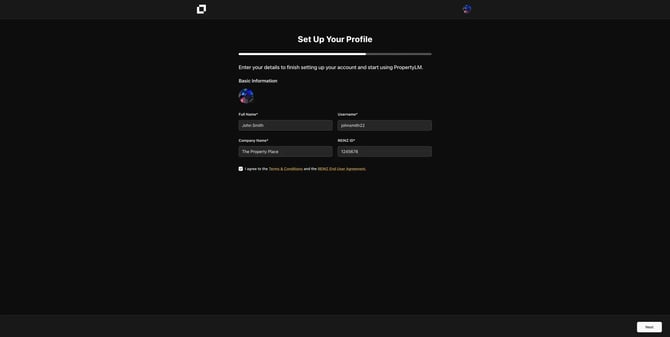
- Enter your full name, e.g John Smith
- Enter a unquie username. e.g. johnsmith22
- Enter the name of the company you work. e.g. The Property Place
- Enter your REINZ ID. e.g 1245678
- You need the enter your REINZ ID to confirm your REINZ membership and access up to date data
- Agree to the terms & conditions, including the REINZ EUA.
Click ‘Next’ to continue
Select the plan you wish to begin with. If you have a promotion coupon, you can enter this on the next screen.
You will now be taken to the secure checkout to enter your payment details.
-
- You can signup to your trial using either Credit Card, Google Pay, Apple Pay, Klarna or Link.
- If you have a promo code, click ‘Add promotion code’ on the left hand side, under your subtotal. Enter the code and click apply.
- Choose your payment method, and click ‘Sign Up’
On success, your account will be setup and you will be logged into the application.